
The LexBatch Limitation Calculator is designed to help lawyers calculate limitation by starting with the applicable legal rule and its statutory trigger, rather than simply adding a period to an arbitrary date. This guide explains the workflow step by step.
How the calculator works
Limitation does not always begin from the date of the transaction, agreement or order. The starting point depends upon the applicable Article and the event specified by law. The calculator therefore follows a four-stage workflow.
Search by legal issue, proceeding or Article number.
Answer the statutory trigger question shown for that rule.
Apply only those exclusions or events that actually occurred.
Check the last date, legal basis, timeline and alerts.
This is why LexBatch asks questions such as when performance was refused, when possession became adverse, when a decree became enforceable, or when an order was passed.
Find the applicable limitation rule
Start with Guided Search when you know the legal problem but are not certain of the relevant Article. You can search using ordinary legal expressions such as specific performance, ex parte decree, adverse possession, rent arrears, loan recovery or execution of decree.
If you already know the Article, use Article / Section mode and search directly by the provision. The filters for Suits, Appeals, Applications and Execution can further narrow the result.
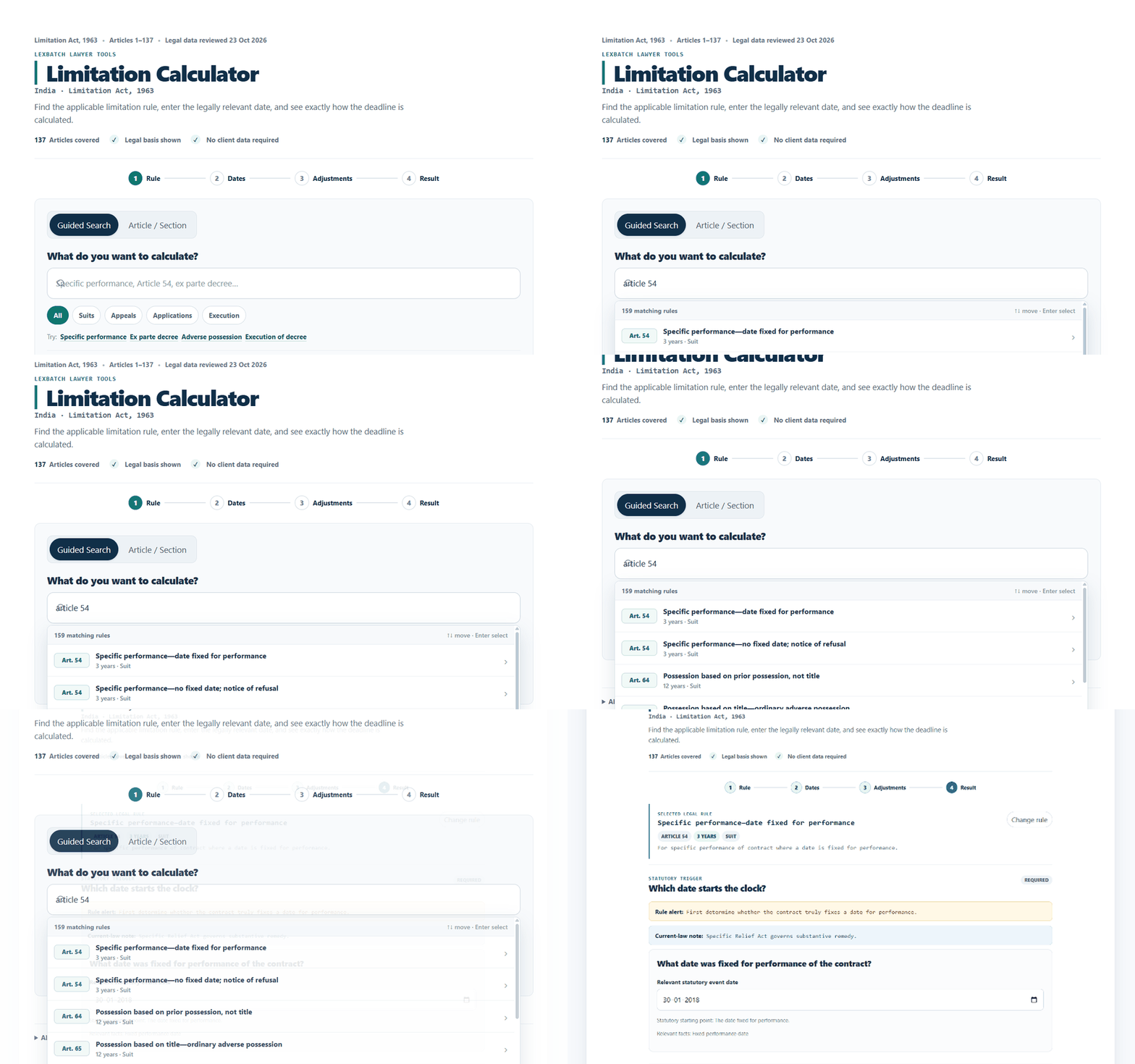
Similar-looking claims can have different starting points. A loan payable on demand, for example, is not necessarily treated in the same manner as a deposit repayable on demand. The calculator therefore identifies the rule before asking for dates.
Answer the statutory trigger question
Once a rule is selected, LexBatch asks the factual question that corresponds to the statutory starting point. This is usually the most important part of the calculation.
Article 54 contains two possible starting points.
Enter the date corresponding to the branch that actually applies to the matter. The calculator preserves that trigger in the final calculation record so that another lawyer can see the assumption on which the computation was based.
The calculation is only as reliable as the legal starting point selected. Where accrual, knowledge, refusal, adverse possession or another trigger is disputed, the calculator can perform the arithmetic but cannot decide the disputed legal fact.
Add exclusions or special circumstances only when relevant
For an ordinary calculation, you can leave the adjustment section closed. No exclusion is assumed automatically.
If something occurred that may legally affect the computation, choose Add adjustment. Depending upon the selected rule, the calculator may offer relevant options such as certified-copy time, an earlier proceeding before the wrong forum, a stay or injunction, acknowledgment, part-payment or another applicable statutory circumstance.
A qualifying period is excluded from the computation, for example where Section 14 applies.
A qualifying acknowledgment or part-payment may create a fresh limitation period where statutory conditions are satisfied.
Section 5 is not added to the limitation period. It is a separate question arising after delay in eligible proceedings.
Entering a date under Section 14, Section 18 or another provision does not itself establish that all statutory requirements are satisfied. Questions such as good faith, due diligence, validity of acknowledgment, fraud, disability or special-law exclusion may require independent legal determination.
Compare a filing date or check court closure
The Add optional check control is useful where you want to compare the result against an actual or proposed filing date, or examine a possible Section 4 court-reopening scenario.
Compare an actual or proposed filing
Enter the filing date to see whether it falls within or beyond the calculated limitation date.
Check a court-closure situation
Where the last day falls on a court holiday, verify the court calendar and consider the statutory reopening rule.
Calculate the limitation period
Once the required trigger date has been entered, click the green Calculate limitation button.
The result begins with the calculated last date and then separates the prescribed period, ordinary expiry and any adjusted expiry. This distinction is deliberate: LexBatch does not hide the underlying calculation behind a single date.
Do not stop at the large date
The result is intentionally designed as an auditable legal calculation. After the calculated date, review the Why this date? section and the legal checks shown alongside it.
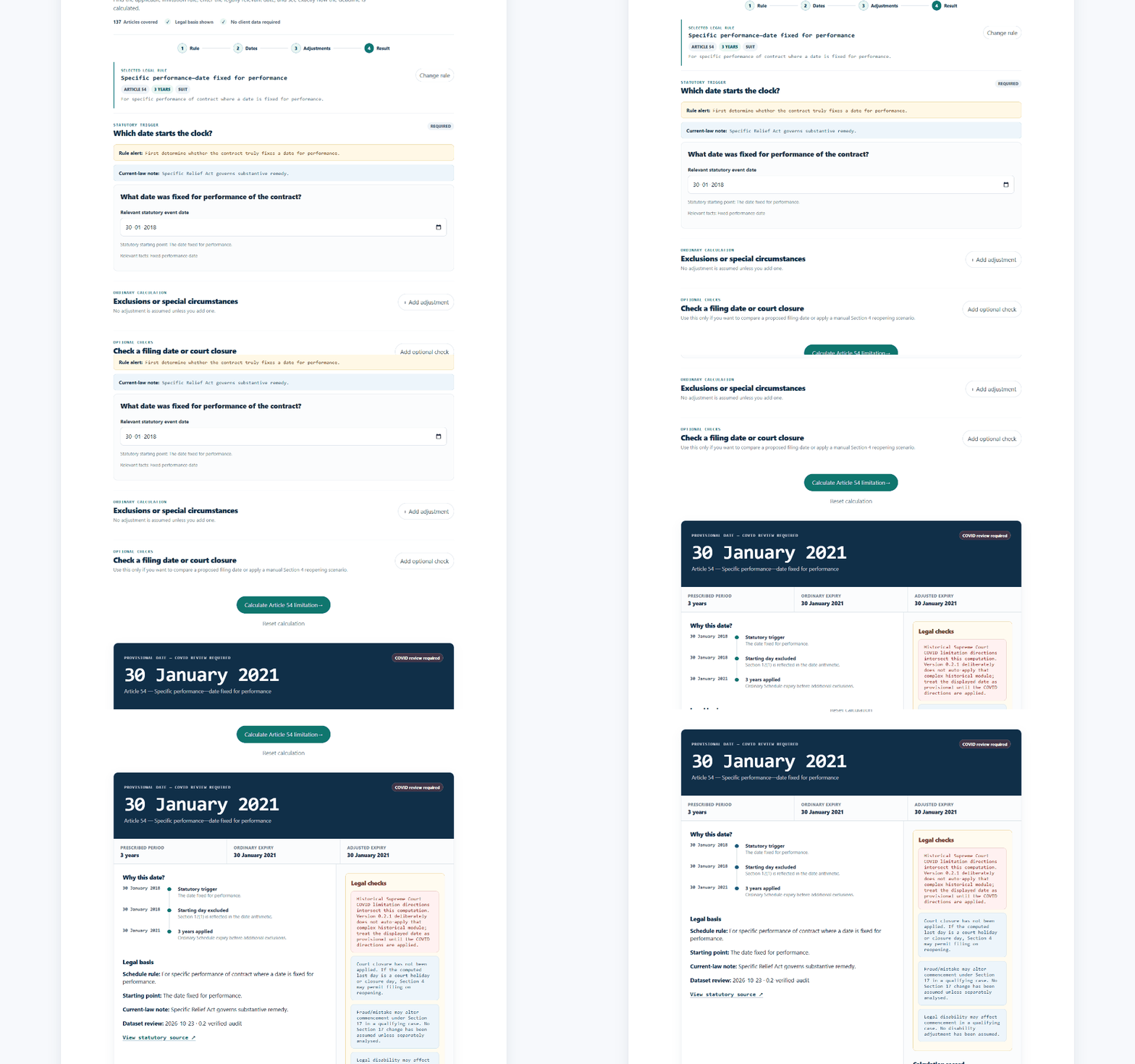
The primary date produced by the calculation.
The applicable Article, period and starting-point rule.
A chronological explanation of how the result was reached.
Issues requiring additional factual, procedural or statutory verification.
Specific performance under Article 54
Assume the plaintiff seeks specific performance and the contract fixes 30 January 2018 as the date for performance.
Because this historical example intersects the Supreme Court’s COVID-19 limitation directions, the calculator also displays a COVID review required warning. This is an example of why the legal-alert panel should always be read together with the arithmetic result.
Use the calculation record in your case file
The result panel includes practical actions for working lawyers. You can copy the calculation as a file note, print the result or add the calculated deadline to a calendar.
Retaining the trigger and assumptions is particularly useful where limitation depends upon notice, knowledge, refusal, dispossession, enforceability or another fact that may later become contentious.
When the calculator should not be treated as the final legal answer
Limitation frequently depends upon legal characterisation as well as dates. The calculator performs the computation using the facts and assumptions selected by the user; it does not adjudicate disputed facts.
When the right to sue or right to apply arose may itself be contested.
The relevant date may depend upon proof of actual or constructive knowledge.
Determining when possession became legally adverse is not merely arithmetic.
A separate statute may prescribe a different period or restrict provisions of the Limitation Act.
Sections 14, 17, 18, 19 and related provisions contain legal conditions beyond dates alone.
Availability of Section 5 and sufficient cause are separate judicial questions.
Common questions
Do I need to know the Article number before using the calculator?
No. Guided Search allows you to search by the legal issue or proceeding. If you already know the Article, use Article / Section mode for faster access.
Does the calculator automatically apply every exclusion under the Limitation Act?
No. Ordinary calculation assumes no additional adjustment. Relevant exclusions or special circumstances must be deliberately added because their applicability depends upon the facts and legal requirements.
Does Section 5 extend the calculated last date?
No. Condonation under Section 5 is treated separately. It does not alter the date on which the prescribed limitation period ordinarily expired.
Can I use the calculator for an actual filing deadline?
Yes, as a legal computation aid. For an important filing, independently verify the applicable provision, special or local law, court rules, holidays and any fact-sensitive issue affecting the starting point or exclusion.
Does LexBatch require client or case details?
No client name, opponent name or case number is required for an ordinary limitation calculation.
Calculate the rule. Check the reasoning. Keep the assumptions visible.
Use the LexBatch Limitation Calculator to identify the applicable Schedule rule, enter the statutory trigger, account for relevant adjustments and review the complete calculation trail.
Open Limitation Calculator